

Most people choose a web host once, when they launch a website, and then live with that choice for years. Moving later is possible, but it costs an afternoon at best and a broken site at worst. A little checking before you sign up saves you that.
These are the things we would look at if we were picking a host for our own business, and the questions that get you a straight answer on each.
The price you pay in year two
The price in large print is often a first-term price. It may only apply if you pay for one to three years up front, and when that term ends the plan renews at the regular rate, which can be more than double. It’s usually all there in the small print, but it’s easy to miss.

- What does this plan cost when it renews?
- Does the advertised price need years paid up front?
- Which extras are free only for the first year (SSL, backups, domain privacy, the domain itself)?
The fair way to compare two hosts is the total for three years, at renewal prices, with the extras you actually need.
What “unlimited” really means
Unlimited storage and bandwidth on cheap plans come with a fair-use policy. Read the acceptable use policy and you’ll usually find limits on the number of files, CPU time or database size, and a clause that lets the host slow down or suspend a site that uses more than its share. A host that gives you the real numbers is easier to plan around than one that doesn’t.
Ask what happens when you reach a limit: does the site slow down, do you pay extra, or is it switched off?
How much traffic the plan can handle
Storage gets the headline, but for WordPress, speed under load mostly comes down to PHP workers: how many requests your site can work on at the same time. Pages served from a cache barely use them. Checkouts, logged-in visitors, searches and the WordPress admin do. When every worker is busy, visitors wait in line, and when the line gets long, they see errors.
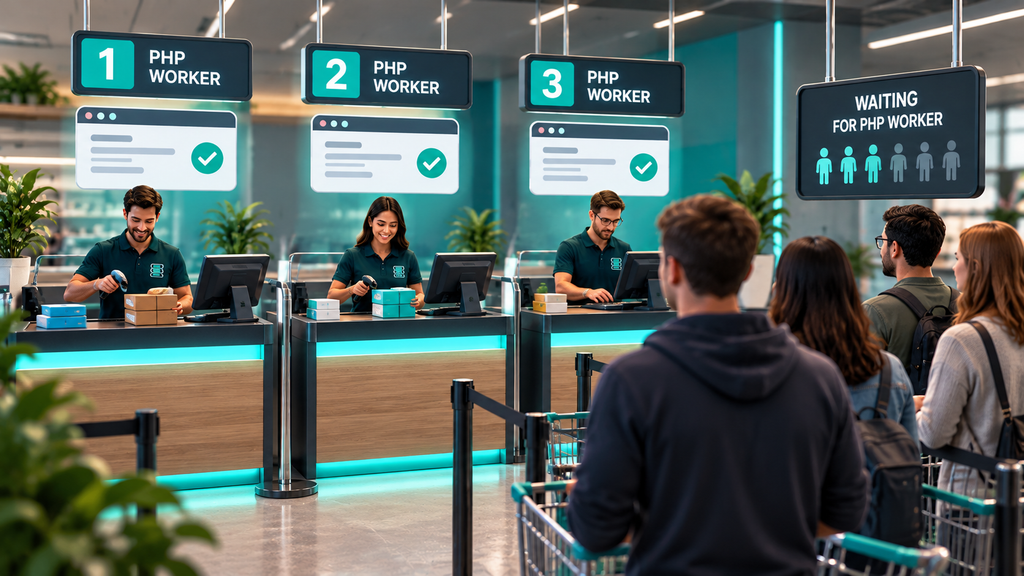
Ask how many PHP workers (some hosts say processes or concurrent requests) the plan includes, whether your site has its own CPU and memory allowance, and what more costs. If a host can’t tell you, assume the number is small.
Whether other websites can affect yours
On shared hosting your website lives on a server with others. Good separation means a busy neighbor can’t slow you down and a hacked neighbor can’t reach your files or your database. Look for each website running as its own user with its own PHP, its own resource limits, and SFTP or SSH logins that are locked inside its own folder.

Ask how websites on the same server are kept apart. A good host gives a specific answer.
Backups you can restore yourself
Every host says it has backups. The useful questions are about getting your site back.

- How often do backups run, and how many copies are kept?
- Are they stored somewhere other than the server your site is on?
- Can you restore one yourself, or do you need to open a ticket? Does a restore cost extra? Some hosts charge for it.
- Can you download a copy?
Whatever the answers, keep a copy of your own somewhere else as well. Backups you can’t easily restore are not worth much on a bad day.
A safe place to try changes
Plugin and theme updates break websites far more often than servers do. A staging copy is a private copy of your site where you try an update first, and then make it live once it works. Check whether staging is included on the plan you want, whether the copy is private (behind a password and hidden from search engines), and whether you can undo after making it live.

Who keeps the software up to date
“Managed hosting” means different things at different hosts. Some update WordPress, plugins and themes for you. Others look after the server and leave the website to you. Either can be right, but you should know which one you’re buying, because outdated plugins are one of the most common ways WordPress sites get broken into.
- Who updates the server and PHP?
- Who updates WordPress, plugins and themes?
- Which PHP versions can you choose? Current versions still get security fixes; old ones don’t.
SSL that renews itself
Free certificates from Let’s Encrypt are standard now. A host shouldn’t charge for a basic certificate or expect you to renew it by hand. Check that it’s issued automatically, covers the www address as well, and renews without you doing anything.
Support you can actually reach
Find out how you contact support (tickets, chat or phone) and when it’s open, whether the first person you reach can fix things or only pass them on, and whether support covers your website or only the server under it.
A good test before you buy: send a pre-sales question with some real detail in it. See how long the answer takes and whether it answers what you actually asked.
Getting in, and getting out
Moving to a new host should be easy, and many offer free WordPress migrations. Leaving should be just as easy.
- Is migration free, and who does the work?
- Are you tied into a contract, or can you cancel monthly? What are the refund terms?
- Can you download your files and databases at any time? SFTP and a database export should be standard.
Keep your domain registered in your own name, at a registrar you control. Then changing hosts is only a matter of pointing the domain somewhere new.
Where the servers are
Servers closer to your visitors mean a little less waiting on every page. For most small business websites the country matters more than the city, and a cache or CDN in front of the site evens out the rest. If most of your customers are in one region, choose a host with servers in or near it.
A control panel you can find your way around
You will spend more time in the control panel than you expect: adding a domain, checking a certificate, restoring a backup. Ask for screenshots or a demo before you buy. Everyday jobs should be easy to find, and the deeper tools (SSH, scheduled tasks, DNS records, PHP versions) should be there when you or your developer need them.

How Ateculus answers these
We wrote this list as the questions we’d want answered, so it’s only fair to answer them ourselves, including the places where we don’t offer something.
- Price: your plan costs the same when it renews. The only discounts are promo codes. Pay monthly or yearly, and cancel from the control panel whenever you like.
- Limits: storage, bandwidth and capacity are real numbers, listed on our pricing page. Capacity comes in Standard, Extra and Max: 3, 5 or 8 PHP workers.
- Separation: each website has its own Linux user, its own PHP pool and its own CPU, memory and process limits. How it works has the full list.
- Backups: daily, weekly or monthly, encrypted with a passphrase you set, stored off the server, and restored by you in one click. See Backups and restores.
- Staging: on the Grow, Scale and Pro plans, behind a password, with 7 days to undo after you make it live.
- Updates: we look after the servers and PHP. You update WordPress, plugins and themes from your WordPress dashboard, as on most hosts. On Scale and Pro, WordPress websites also get a nightly security score that flags known holes in plugins and themes, with an Update it button in the control panel where a fix exists.
- SSL: free Let’s Encrypt certificates, issued and renewed automatically.
- Support: tickets, answered by the people who built the platform.
- Moving in: our WordPress migration plugin is free. See Move a WordPress site to Ateculus.
- What we don’t do yet: our servers are in San Francisco, with New York on request (tell us where else you need one), we don’t host email or sell domains, and we serve customers in the United States.
Whoever you choose, ask these questions first. A host that answers them plainly is usually a host that will treat you well later.