

Finding out you have a hacked WordPress site is a horrible feeling. Maybe a customer emailed about a strange redirect, Google is showing a warning, or the home page has been replaced with something you never wrote. The urge is to start clicking everything at once.
Slow down for a minute. Most WordPress hacks are recoverable, and what you do in the first hour decides how cleanly. This is the order we’d work in.
Write down what you see first
Before you change anything, take two minutes to record what’s happening. Take screenshots of the hacked pages, note the time, copy any strange URLs the site redirects to, and save any warning emails you’ve received. If you’re working with a developer, your host or an insurer later, this is the first thing they’ll ask for, and it’s gone once you start fixing.
If you can, download a copy of the hacked site too: the files over SFTP and an export of the database. It feels odd to keep the broken version, but it’s often the only way to work out how the attacker got in after you’ve restored a clean copy.
Contain it
The next goal is to stop the damage spreading to your visitors. A hacked site might be redirecting people to scam pages, serving malware or collecting card details from your checkout.
The quickest fix is to put the site behind a password so the public can’t reach it while you work. Many control panels can do this in a click; on ours it’s called password protection. A maintenance-mode plugin is less reliable here, because the attacker may have access to WordPress itself.
If you run a shop, consider pausing payments in your payment processor’s dashboard until you know the checkout is clean.

Change every password and key
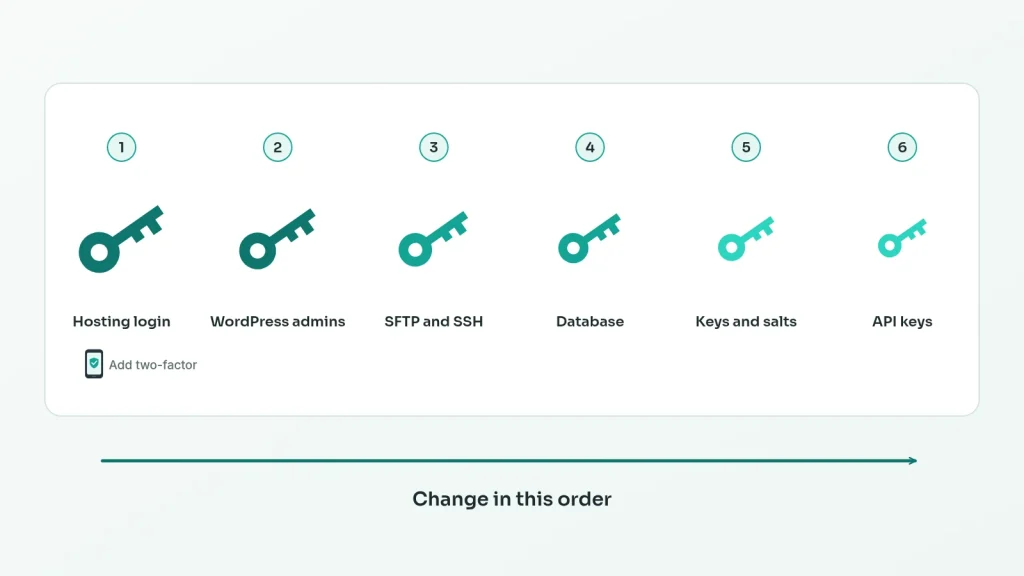
Assume any password connected to the site has been seen. Change them from a computer you trust, starting with the ones that control everything else:
- Your hosting control panel login. Turn on two-factor login while you’re there if it isn’t already.
- Every WordPress administrator password.
- SFTP and SSH logins. If you don’t need SFTP right now, switch it off.
- The database password. Remember to update it in
wp-config.phptoo, or the site will stop working. - The security keys and salts in
wp-config.php. Replacing them logs everyone out, including the attacker. WordPress.org has a generator for new ones. - API keys stored in the site, such as for your payment processor, email sending service or SMTP plugin.
Also change the password on the email account that receives WordPress password resets. If an attacker controls that inbox, they can reset everything you just changed.
Check who has access
Attackers like to leave a way back in, and a new administrator account is the easiest one. In WordPress, go to Users and filter by Administrator. Delete any account you don’t recognize, and look closely at ones that look nearly right, like a slightly misspelled version of a real name.
Do the same in your hosting account. Check the list of people with logins, and if your control panel has an audit log, scan it for sign-ins or changes you didn’t make. Look for unfamiliar scheduled tasks as well; a cron job that quietly re-downloads malware every hour is a common trick.
Restore a clean backup or clean in place
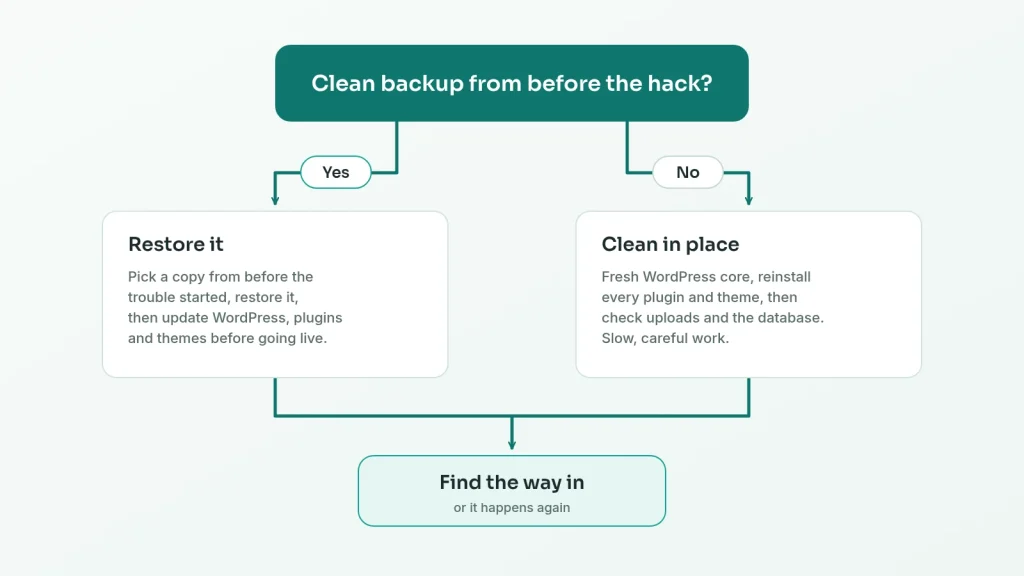
There are two ways back to a clean site, and the right one depends on what you have.
Restoring from a backup
If you have a backup from before the hack, restoring it is usually the fastest and most reliable route. The catch is knowing when the hack started. Look at your screenshots, at file dates and at when the strange behavior first appeared, then pick a copy from comfortably before that. Restoring replaces everything, so anything added since that copy, like orders or form entries, is lost. That’s why you downloaded the hacked copy first.
Cleaning in place
If there’s no clean backup, or it’s too old to use, you’ll need to clean the existing site. That means replacing WordPress core files with fresh copies, reinstalling every plugin and theme from its original source, and then searching the uploads folder and database for anything that doesn’t belong. It’s slow, careful work, and easy to miss something. If you’re not comfortable doing it, this is the point to bring in a developer or a specialist cleanup service.
Update everything before you go live
A restored site is a copy of the site that got hacked. If the way in was an outdated plugin, the restored copy still has that plugin, and the attacker can walk straight back in.
Before you take the password off, update WordPress, every plugin and every theme. Delete plugins and themes you don’t use; deactivated plugins can still be attacked. If a plugin hasn’t been updated by its author in a long time, replace it. Check that your PHP version is current too.
Find the way in
Restoring without knowing how they got in is a guess. The usual suspects, roughly in order:
- A plugin or theme with a known vulnerability that wasn’t updated
- A weak or reused administrator password
- A pirated “nulled” premium plugin or theme, which often comes with a backdoor built in
- A leaked password for the hosting account, SFTP or email
Compare the list of plugins in the hacked copy against public vulnerability reports for each one. Look at which files changed recently, and at the dates and names of new admin users. Your host may be able to help you read the evidence.
Tell the people who need to know
Open a ticket with your host early, not as the last step. They may see something from the server side, and they need to know if your site was used to attack anyone else. If you have a developer or agency, tell them too.
If customer data may have been exposed, such as names, emails or anything from a checkout, talk to your payment processor and get advice on whether you need to notify customers. The rules depend on your state and what was taken. Finally, once the site is clean, check Google Search Console for security warnings and request a review if your site was flagged.
How Ateculus helps with a hacked WordPress site
We don’t offer malware cleanup or malware scanning as a product, and we don’t update WordPress for you. What we do give you:
- Password protection to take a site offline to the public in a click
- Encrypted backups you restore yourself, kept off the server
- Two-factor login, team logins with their own permissions, and an audit log our support team can check for you
- Isolation, so a hacked site can’t reach the other websites on its server
If your site is hacked, open a support ticket. Our team will help you work out what happened and get a clean copy restored. On Scale and Pro, the nightly security score also flags changed WordPress files and known holes in your plugins and themes.