

Almost every small business website shares a server with other websites. That’s normal and sensible: a whole server for one brochure site would be a waste of money. The part that matters is website isolation: how well those websites are kept apart.
On a well-built server, the website next to yours could be hacked, crash or get a sudden rush of traffic, and you’d never know. On a poorly built one, any of those can become your problem. This post explains how that happens and what good isolation looks like, so you can tell the difference when you’re choosing a host.
What a shared server actually shares
A web server runs a handful of programs that every website on it uses: the web server software that receives visitors, PHP that runs the website’s code, and a database server that stores its content. The websites themselves are just folders of files and databases.
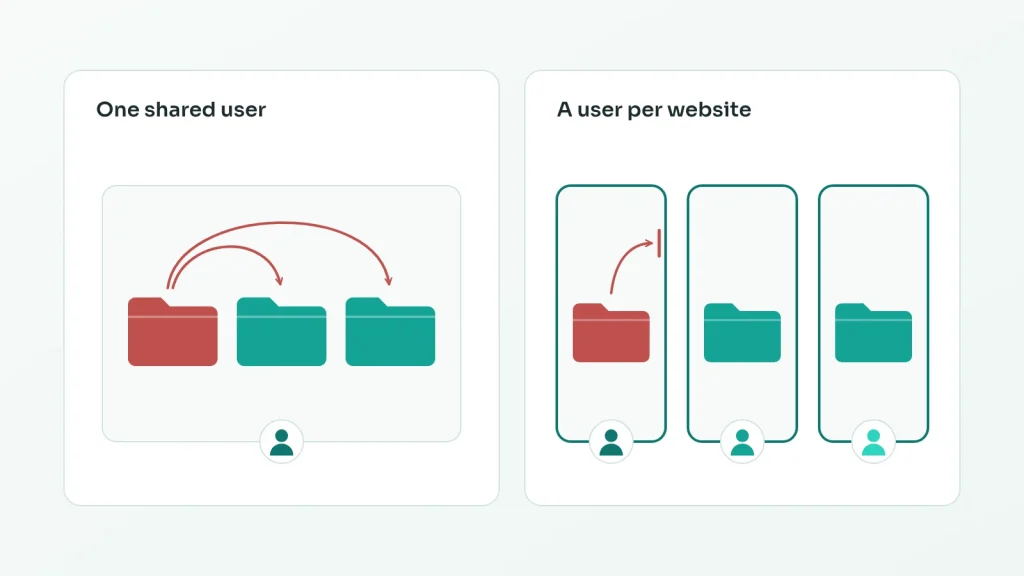
The question is what stands between those folders. Every program on a Linux server runs as a user, and that user decides which files it can read and write. If all the websites run their PHP as the same user, then as far as the server is concerned, they’re one big website. The walls between them are only as strong as the weakest site’s code.
When every site runs as the same user
This is the classic weak setup, and it still exists on some cheap plans. All the websites’ PHP runs as one shared account, often the same account as the web server.
Here’s what that means in practice. Say the site next to yours is running a plugin with a known hole, and an attacker uses it to upload a small PHP script. That script runs as the shared user. The shared user can read every website’s files, because it has to in order to serve them. So the attacker’s script can walk across the folders, read your files, and change them.
You did nothing wrong. Your plugins were up to date. You were hacked through someone else’s site.
Readable files and the password in your config
Even where sites run as separate users, file permissions can undo the separation. Many applications keep their database password in a plain-text file inside the website: wp-config.php for WordPress, .env for Laravel, configuration.php for Joomla. If those files are readable by other users on the server, a compromised neighbor can read your database password and connect to your database directly.
Once someone has your database, they can add an administrator to your WordPress site, change your content, or copy your customer list. They never need to touch your files at all.
Temporary files and PHP sessions are a quieter version of the same problem. If every site writes its temporary files and login sessions into one shared folder, a neighbor can sometimes read or tamper with them.
The neighbor that eats the server
Not every problem is a break-in. A server has a fixed amount of CPU, memory and disk. Without limits per website, one site can take more than its share and everyone else slows down.
It happens for ordinary reasons: a site gets a burst of traffic, a badly written plugin runs a slow database query on every page, or a bot crawls thousands of pages at once. It also happens for bad ones: a hacked site sending spam or mining cryptocurrency will happily use every bit of CPU it can find.
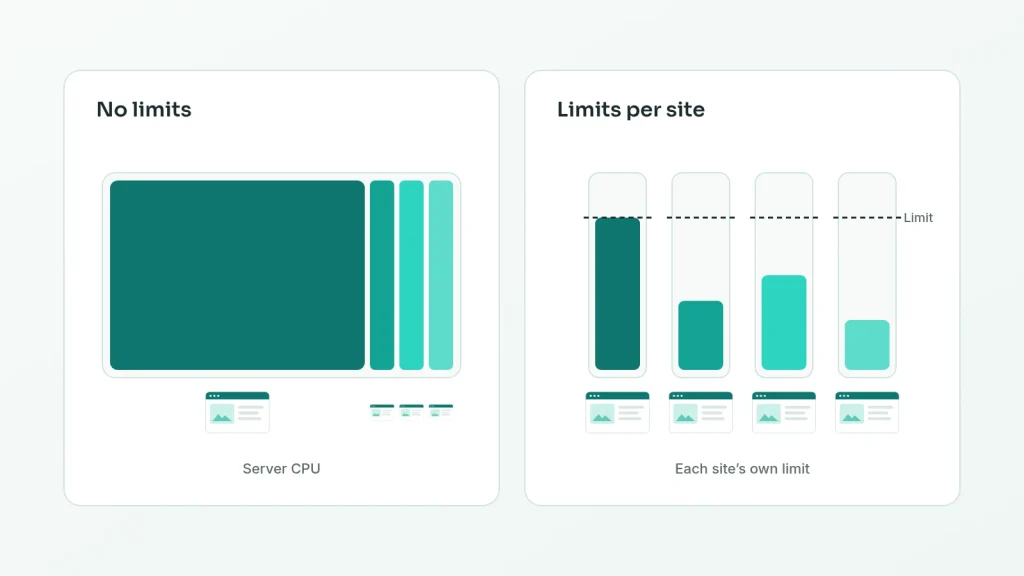
Either way, if the server doesn’t put limits on each website, your pages load slowly or time out, and you can’t fix it because the cause isn’t on your site.
What proper website isolation looks like
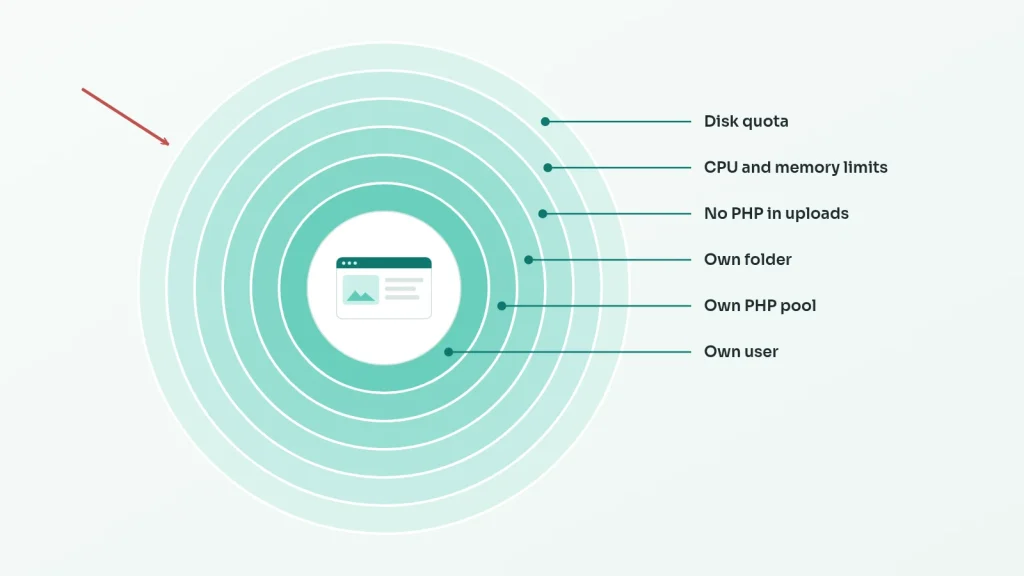
Good isolation stacks several layers, so that if one fails, the next one still holds. Here’s what to look for:
- Each website runs as its own Linux user, so the operating system itself keeps their files apart.
- Each website has its own PHP process pool, running as that user, rather than one PHP shared by everyone.
- PHP is restricted to the website’s own folder (PHP’s open_basedir setting is one way to do this), with its own private temporary files and sessions.
- PHP functions that let code run arbitrary system commands are switched off.
- Files uploaded through the website can’t be run as PHP, so an uploaded script just sits there as a file.
- SFTP and SSH logins are locked inside the website’s folder. Other sites aren’t just off-limits; from inside, they aren’t visible at all.
- CPU, memory and process limits for each website, plus a disk quota, so a runaway site hits its own ceiling, not yours.
- Other users’ processes are hidden, so a site can’t even see what else is running.
- Each database has its own user and password, and databases can’t be reached from outside the server.
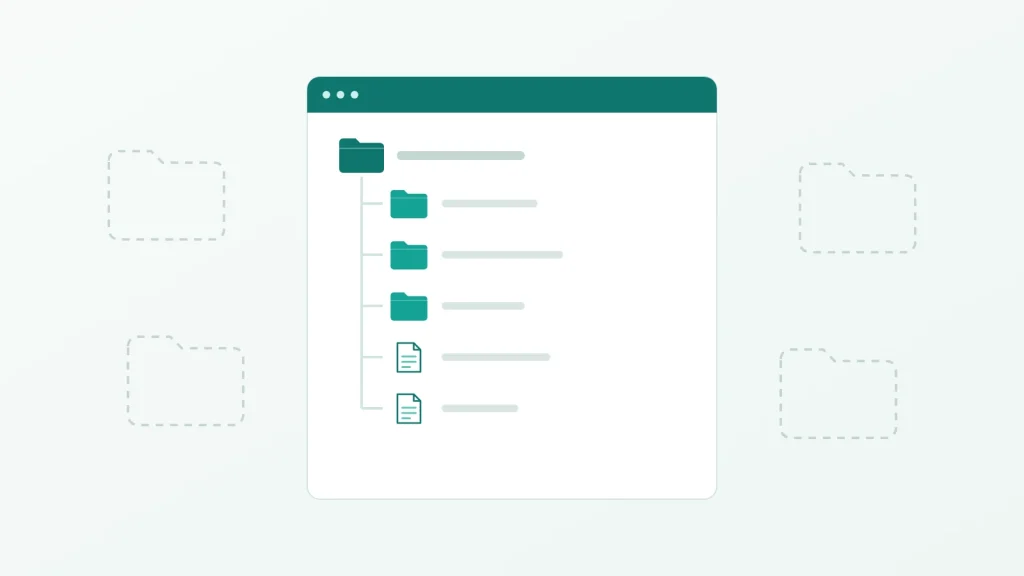
None of these is new or exotic. They’re standard Linux tools used carefully. What varies between hosts is whether they’re all in place, on every server, every time.
What isolation doesn’t do
Isolation protects you from other people’s websites. It doesn’t protect your website from itself. If your own WordPress site has an outdated plugin with a hole in it, an attacker can still get into your site. What isolation does is make sure that’s where it stops: they can’t use your site to reach anyone else, and nobody else’s mistake reaches you.
So isolation is one half of the job. The other half is keeping your own software updated, using strong passwords with two-factor login, and having backups you can restore.
How to check a host’s isolation
You usually can’t see a host’s server setup before you buy, but you can ask. Some questions that get a useful answer:
- Does each website run PHP as its own user, with its own PHP pool?
- Are there CPU and memory limits per website, and what are they?
- Are SFTP logins locked to the website’s own folder?
- Can uploaded files be run as PHP?
- Is each database reachable only from the server?
A host that has done this work will be glad you asked. Vague answers like “enterprise-grade security” usually mean the details aren’t there.
How Ateculus keeps websites apart
Every item on the list above is how our web servers are built. Each website has its own Linux user and its own PHP pool. PHP is kept to the website’s own folder with private temp files and sessions, dangerous PHP functions are switched off, and uploaded files can’t run as PHP. SFTP and SSH logins are locked inside the website’s folder, other users’ processes are hidden, and each website has its own CPU, memory and process limits set by its capacity, plus a disk quota. Databases have their own users and can’t be reached from outside the server.
What we don’t do is look after your website’s own code: you update WordPress, plugins and themes. The full list is on How it works, and plan limits are on our pricing page.